 UltraGX
AI narrative
The pipeline documents the KB with deterministic rules. The narrative is an optional step that adds prose written by a language model to each document: the purpose of the object, a summary, the intent of each event, the rules explained in business terms, migration notes and a glossary.
What sets it apart from pasting the code into a chat is validation: the model receives the already analysed document (not raw GeneXus) and UltraGX checks that every attribute, table, variable or object it cites really exists in that object. If the model invents a name, it is asked to correct it; if it insists, the prose is not published.
The narrative runs on a project already generated by the pipeline.
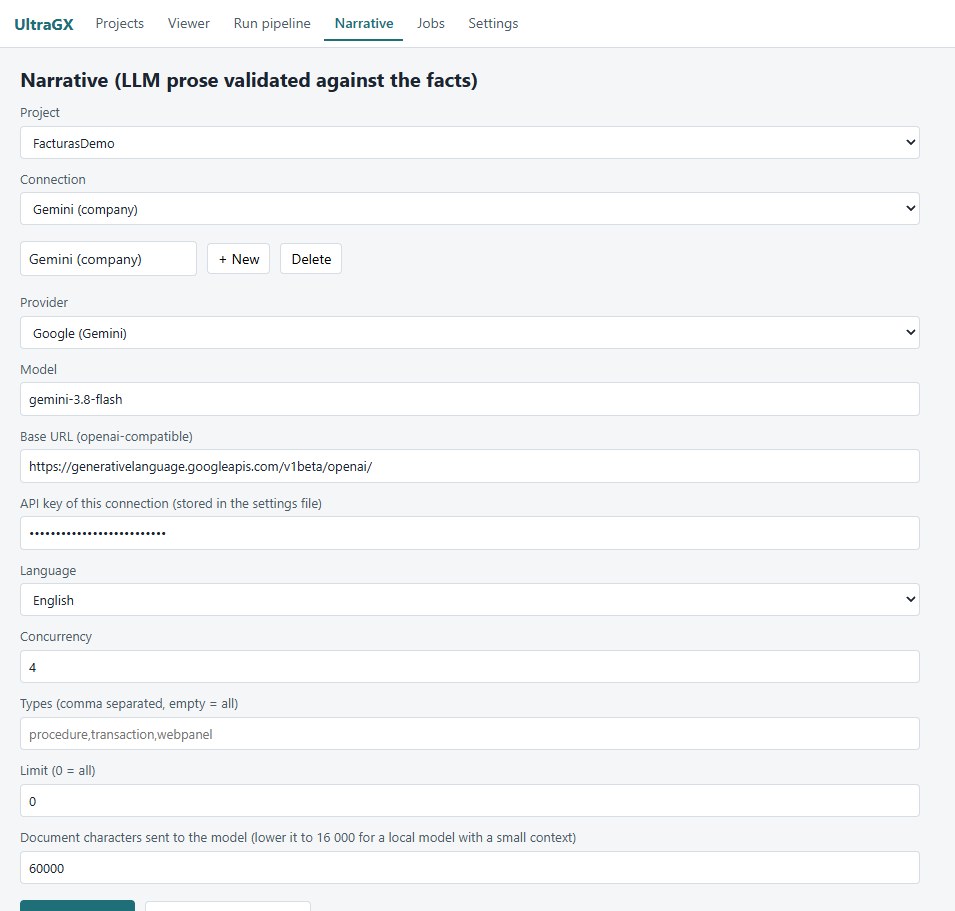
Connections
A connection is a provider, a model and its credentials, saved under a name. You can have several (for example, a company account and a local model) and choose which one to use on each run.
- In Connection, click + New and type a name.
- Choose the Provider. Model and Base URL are filled in with default values that you can change.
- Paste the API key of this connection, or tick Runs locally if you use a model on your computer or your network.
- Changes are saved when you run. Delete removes the selected connection.
| Provider | Default model | Notes |
|---|---|---|
| Anthropic (Claude) | claude-sonnet-5 | Very good prose quality and respect for names |
| OpenAI (GPT) | gpt-4o-mini | |
| Google (Gemini) | gemini-3.8-flash | Large context and fast; a good choice for large KBs |
| DeepSeek, Zhipu (GLM), Moonshot (Kimi), Alibaba (Qwen) | depends on the provider | Support Runs locally if the model is on your own infrastructure |
| Google (Gemma) | gemma3:latest | Designed to run locally |
| OpenRouter | a model from its catalogue | A single key for many models |
| mock (no model) | — | Generates test text at no cost; useful to check the flow |
Local models
With Runs locally, the API key is hidden and the Base URL points to your OpenAI-compatible server: http://localhost:11434/v1 for Ollama, http://localhost:1234/v1 for LM Studio, or the address of another machine on your network. Install and download the model on that server before running (for example ollama pull qwen3.6).
With a local model no document leaves your network. The trade-off is speed and context size: if the model has a small context window, lower Document characters sent to the model to 16,000 or less.
Where keys are stored
API keys are stored in the UltraGX settings file (%APPDATA%\UltraGX\settings.json on Windows, ~/.config/UltraGX/settings.json on Linux and macOS), inside your user profile. They are not written to the output folder or sent to UltraGX. Treat that file as a secret.
Run options
| Option | What it does |
|---|---|
| Project | the project to narrate |
| Language | language of the prose (ideally the same as the project) |
| Concurrency | objects in parallel. With cloud providers, 4 to 8 speeds things up a lot; with a local model, 1 |
| Types | object types to narrate, separated by commas (for example procedure,transaction,webpanel). Empty = all types with logic |
| Limit | maximum number of objects in this run (0 = all). Useful to try with 10 objects before launching the whole KB |
| Document characters sent to the model | maximum size of each document sent (60,000 by default). Longer documents are truncated |
With Types empty, UltraGX does not narrate declarations: attributes, domains, SDTs, subtype groups, external objects, data views and pattern settings. Their deterministic document already says everything there is to say and narrating them only spends tokens. If you still want to narrate any of them, write it in Types.
Running, following and resuming
Click Run / resume. The log shows each object with its result. Each response is merged into its document immediately: you can open the object in the Viewer (with Reload) while the run continues, and the full viewer is regenerated periodically and at the end.
If you stop the run or it is interrupted, click Run / resume again: objects already narrated are not sent again.
Results per object
| Status | What it means | Published |
|---|---|---|
ok | the prose passed validation | yes, in the Business meaning section and in the corresponding sections |
degraded | after the retries, the model kept citing names that do not exist in the object | no; the document shows a notice with the invented names |
error | the provider failed (invalid key, quota exhausted, invalid response, timeout) | no |
Retry degraded / errors processes only those objects again. Transient provider errors (rate limits, 5xx errors, network drops) are already retried automatically with progressive back-off during the run.
The status of all objects is on the viewer's Narrative page and in the Narrative column of the object list.
Costs and privacy
- Each object is one call to the model with its full document (up to the character limit). To estimate the cost, run with Limit 20, look at the tokens the log reports at the end and extrapolate to the number of objects with logic in your KB.
- With cloud providers, each object's document (including its GeneXus code) is sent to that provider with your account and under its terms. If the KB has confidentiality restrictions, use a local model or a provider approved by your organisation.
- In the demo edition only the sample objects are narrated.