 UltraGX
First start and licence
UltraGX needs a licence to run the engine. The first time you open the application without a licence, the Start your 10-day demo form appears. From there you can request the demo or, if you have already bought the full edition, use your code.
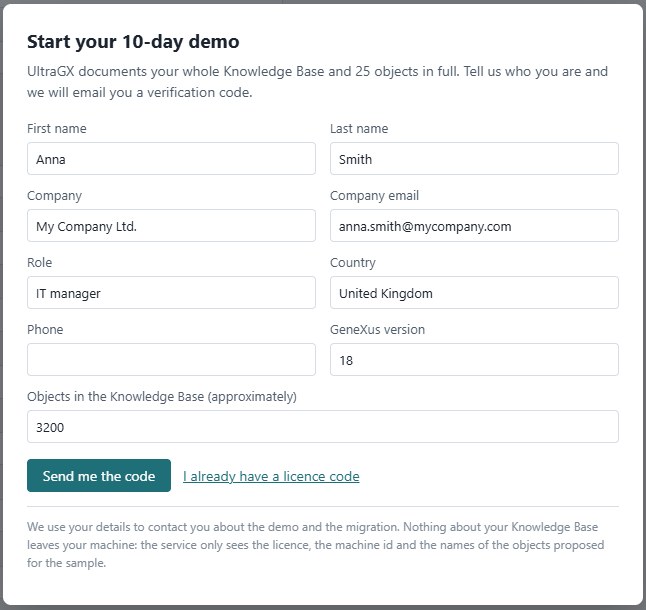
Requesting the demo
- Fill in the form. First name, Last name, Company and Company email are required; the rest (Role, Country, Phone, GeneXus version, Objects in the Knowledge Base (approximately)) helps us prepare the conversation about the migration.
- Use your company email. The demo is issued to companies evaluating a migration and the service rejects personal email addresses (Gmail, Outlook, Hotmail, Yahoo, iCloud and similar).
- Click Send me the code. Within a couple of minutes an email arrives with a six-digit code.
- Type the code and click Activate the demo. The code is valid for 15 minutes.
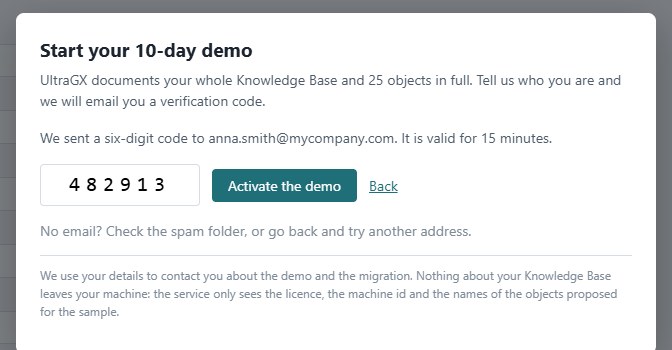
If the email does not arrive, check your spam folder. If it still does not show up, click Back and request the code again (or try another company address).
Once the demo is active, the form closes and the application shows the DEMO edition notice in the top bar.
What the demo includes
- 10 days counted from installation on that machine. Reinstalling or requesting another code does not restart the period.
- One demo per machine and one per email address.
- The whole KB is analysed and documented at the level of inventory, data model, graph, clusters, call trees and diagrams. 25 objects get the detailed document; the engine chooses them among the most connected business objects, spread across types, so that the sample is representative. The same 25 are kept even if you run the KB several times.
- Every run needs internet to check with the licence service. If there is no connection, the run still finishes but without detailed objects, and the notice is shown in the README and in the viewer.
Activating the full edition
When you buy the licence you will receive a code of the form ULGX-XXXX….
- On first start: in the form click I already have a licence code, paste the code and click Activate with a code.
- With the application already in use (for example, when moving from the demo to the full edition): go to Settings → License, paste the code into Activation code and click Activate with a code. Leave the License service URL field empty unless we tell you otherwise.
Activation binds the licence to that machine. After activation, the full edition does not connect to the service again.
Installing a licence file
For installations without internet access we can give you an ultragx.lic file instead of a code:
- In Settings → License copy This machine id and send it to us.
- When you receive the file, click Install license file… and select it.
The file is stored in %APPDATA%\UltraGX\ultragx.lic (Windows) or ~/.config/UltraGX/ultragx.lic (Linux and macOS).
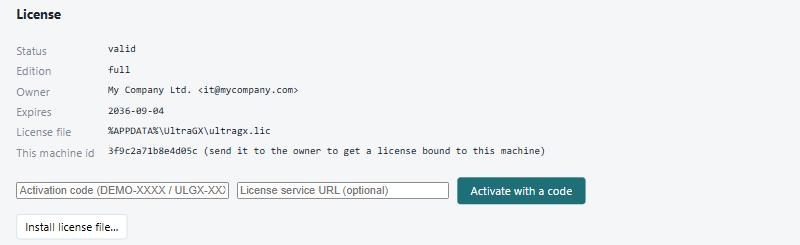
Checking the licence status
Settings → License shows:
| Field | What it means |
|---|---|
| Status | valid, or the reason why it is not |
| Edition | DEMO with the number of detailed objects and the service it checks with, or full |
| Owner | company and email it was issued to |
| Expires | expiry date, or never |
| License file | where it is installed |
| This machine id | identifier used to bind the licence |
Registration and activation messages
| Message | Cause | What to do |
|---|---|---|
| Please use your company email address… | You entered a personal email address | Register with your company address |
| This email address already activated a demo… | That address has already been used | Write to contact@ultra-gx.com if you need more time |
| The demo period on this machine is over… | The 10 days have passed | Write to us to continue with the full edition |
| Wrong code… | The code does not match | Check the latest email received and type it again |
| The code expired… | More than 15 minutes have passed | Back and request a new one |
| Too many wrong codes… | Five failed attempts | Back and start again |
| Too many attempts from this network… | Many requests in a row from the same network | Wait a while and try again |
| Check the fields… | A required field is missing or not valid | Fill in first name, last name, company and a valid email |
| The licence service could not be reached… | No internet, or a proxy/firewall blocks licenses.ultra-gx.com | Check the connection; on corporate networks ask for HTTPS to licenses.ultra-gx.com to be allowed |